Export Directory
Note Lets talk about how the loader find the export funtions exported by the DLLs. Lets first look at the structure definition of export directory from winnt.h header file.
typedef struct _IMAGE_EXPORT_DIRECTORY {
    DWORD   Characteristics;
    DWORD   TimeDateStamp;
    WORD    MajorVersion;
    WORD    MinorVersion;
    DWORD   Name;
    DWORD   Base;
    DWORD   NumberOfFunctions;
    DWORD   NumberOfNames;
    DWORD   AddressOfFunctions;     // RVA from base of image
    DWORD   AddressOfNames;         // RVA from base of image
    DWORD   AddressOfNameOrdinals;  // RVA from base of image
} IMAGE_EXPORT_DIRECTORY, *PIMAGE_EXPORT_DIRECTORY;
There are some more important fields than the others. They following are all arrays:
- AddressOfFunction - RVAs of function ( or pointers ) which are exported in the DLL, and this array is called export address table.
- AddressOfNames - The names of the functions from the export adderess table
- AddressOfNameOrdinals. - This is the array of numbers.
The field NumberOfFunctions lists ther number of exported functions.
The field NumberOfNames lists the number of entried from the array AddressOfNames and AddressOfNameOrdinals. These sizes of these arrays are similar.
Another field is Name holds the RVA to string with the name of the DLL. The base contai ns the first ordinal number of the DLL.
The DLL can export the functions as names and ordinals ( just a number!).
Lets see how the loader find address to an export function. Lets look at the image below:
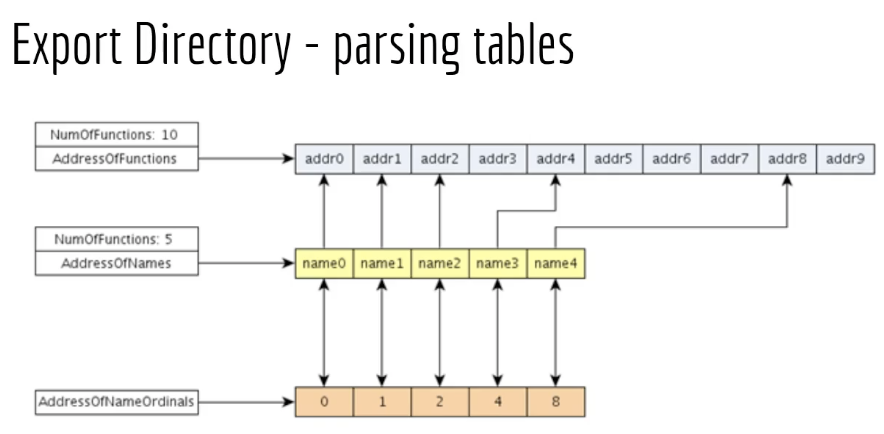
Lets say the loader is looking for a function with name name3. The loader first checks the array AddressOfNames which is the array that holds the name of the exported functions. The loader finds the name in the array at an particular offset. The loader then checks the array AddressOfNameOrdinals which is array that contains some numbers. At the same offset from the AddressOfNames, the loader finds the ordinal that corresponds to function Name3 which is 4.
Now, armed with this information, loader would then check the 4 memory location in AddressOfFunction to find the RVA of name3 function.
There are sometimes situations when we do not have function name instead only ordinal number is provided. In which case to find the RVA, we find the base of the ordinal, and substract it from the ordinal which we have. For example if 6 is the number then 6-1=5 would be the location where out RVA is located.
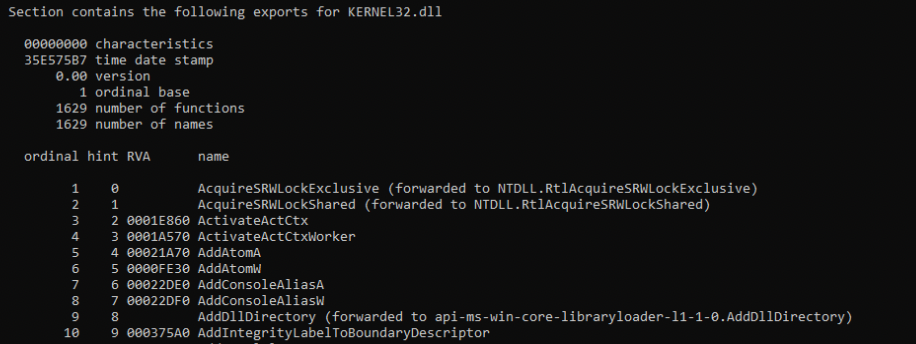
Lets take the example of kernel32.dll which are hundreds of export functions. Under Optional Hdr, and Export Directory has the address 90190.

We match the values in the address location with that of fields desribed in the definition:

Using the Go to RVA component, we check the RVA location 094151
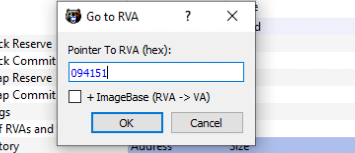
Clicking on OK, the name of the function was observed as Kernel32.dll:

Going further we observed the base field constains the value 1 which means number of ordinal starts at 1. The NumberOfFunctions holds value 065D which in decimal 1629 functions. The NumberOfNames has the same value 065D. The last three are arrays which we discussed earlier. To View these values already resolved, we can click on Exports tab of PE Bear.
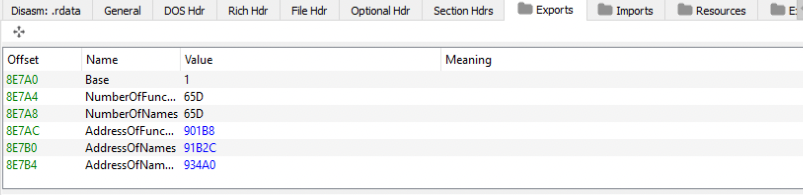
If we click on the AddressOfFunctions value 901BB, addresss layout would show their values.
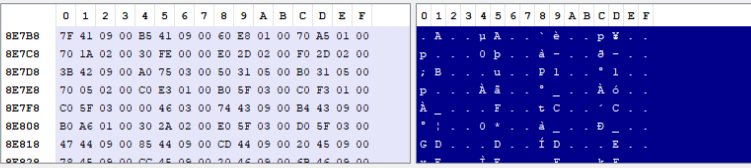

The other two arrays are also resolved in similar fashion.
Another interesting thing to note is related is the function RVA addresses location, for example the high address locations 9417F and there are low address locations 1e860. When one of low address locations are clicked, we are in the .text section of the PE.
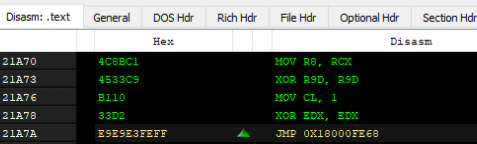
But high addresses are in the .rdata sections:
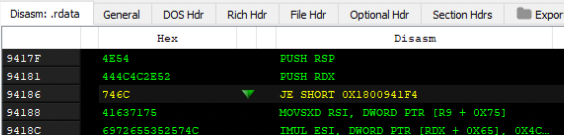
Upon resolveding the address locations pointed by the RVA, we notice another DLL name:
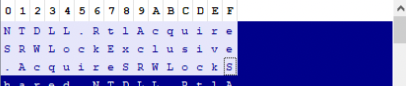
So, when the loader finds another string instead of RVA, this is usually a forwarder which points to another string, in this case NTDLL.RtlAcquireSRWLockExclusive. The loader would go to this new DLL, parse that DLL and look for the function AcquireSRWLockExclusive. This function address is returned.
But, how does the loader know that offset mentioned is a forwarded function or an RVA ? If the address falls within the range of Export Directory range, then its a forwarded function.

To see same information with dumpbin, we can do that with the command
dumpbin /exports C:\Windows\system32\kernel32.dll